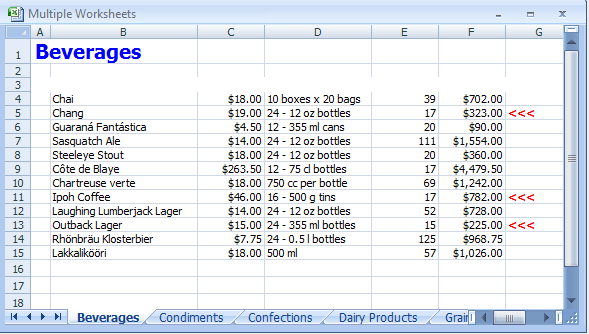
using C1.C1Excel;
using MvcExplorer.Models;
using System;
using System.Collections;
using System.Collections.Generic;
using System.Drawing;
using System.IO;
using System.Linq;
using System.Web;
using System.Web.Mvc;
namespace MvcExplorer.Controllers.Excel
{
public partial class ExcelController : Controller
{
public ActionResult Index()
{
return View();
}
private C1NWindEntities db = new C1NWindEntities();
XLStyle _styTitle;
XLStyle _styHeader;
XLStyle _styMoney;
XLStyle _styOrder;
C1XLBook _c1xl = new C1.C1Excel.C1XLBook();
protected static string TEMP_DIR;
public ActionResult GenerateExcel()
{
TEMP_DIR = Server.MapPath("~") + "\\Temp";
if (Directory.Exists(TEMP_DIR))
{
}
else
{
Directory.CreateDirectory(TEMP_DIR);
}
string filename = CreateExcelFile();
try
{
Response.Clear();
Response.Charset = "UTF-8";
Response.ContentEncoding = System.Text.Encoding.UTF8;
Response.AddHeader("Content-Disposition", "attachment; filename=" + filename);
Response.ContentType = "application/ms-excel";
Response.TransmitFile(filename);
Response.Flush();
System.IO.File.Delete(filename);
Response.End();
}
catch (Exception ex)
{
Response.Write(ex.Message);
}
return View();
}
private string CreateExcelFile()
{
_c1xl.Clear();
_c1xl.Sheets.Clear();
_c1xl.DefaultFont = new Font("Tahoma", 8);
_styTitle = new XLStyle(_c1xl);
_styHeader = new XLStyle(_c1xl);
_styMoney = new XLStyle(_c1xl);
_styOrder = new XLStyle(_c1xl);
_styTitle.Font = new Font(_c1xl.DefaultFont.Name, 15, FontStyle.Bold);
_styTitle.ForeColor = Color.Blue;
_styHeader.Font = new Font(_c1xl.DefaultFont, FontStyle.Bold);
_styHeader.ForeColor = Color.White;
_styHeader.BackColor = Color.DarkGray;
_styMoney.Format = XLStyle.FormatDotNetToXL("c");
_styOrder.Font = _styHeader.Font;
_styOrder.ForeColor = Color.Red;
List<Category> categories = db.Categories.ToList<Category>();
foreach (Category category in categories)
{
CreateSheet(category);
}
string uid = System.Guid.NewGuid().ToString();
string filename = Server.MapPath("~") + "\\Temp\\testexcel" + uid + ".xls";
_c1xl.Save(filename);
return filename;
}
private void CreateSheet(Category category)
{
string catName = category.CategoryName;
string sheetName = catName.Replace("/", " + ");
XLSheet sheet = _c1xl.Sheets.Add(sheetName);
sheet[0, 0].Value = catName;
sheet.Rows[0].Style = _styTitle;
sheet.Columns[0].Width = 300;
sheet.Columns[1].Width = 2200;
sheet.Columns[2].Width = 1000;
sheet.Columns[3].Width = 1600;
sheet.Columns[4].Width = 1000;
sheet.Columns[5].Width = 1000;
sheet.Columns[6].Width = 1000;
int row = 2;
sheet.Rows[row].Style = _styHeader;
sheet[row, 1].Value = "Product Name";
sheet[row, 2].Value = "Unit Price";
sheet[row, 3].Value = "Qty/Unit";
sheet[row, 4].Value = "Stock Units";
sheet[row, 5].Value = "Stock Value";
sheet[row, 6].Value = "Reorder";
List<Product> products = db.Products.Where(pro => pro.CategoryID == category.CategoryID).ToList<Product>();
foreach (Product product in products)
{
row++;
sheet[row, 1].Value = product.ProductName;
sheet[row, 2].Value = product.UnitPrice;
sheet[row, 3].Value = product.QuantityPerUnit;
sheet[row, 4].Value = product.UnitsInStock;
double valueInStock =
Convert.ToDouble(product.UnitPrice) *
Convert.ToInt32(product.UnitsInStock);
sheet[row, 5].Value = valueInStock;
if (Convert.ToInt32(product.UnitsInStock) <=
Convert.ToInt32(product.ReorderLevel))
{
sheet[row, 6].Value = "<<<";
sheet[row, 6].Style = _styOrder;
}
sheet[row, 2].Style = _styMoney;
sheet[row, 5].Style = _styMoney;
}
if (products.Count == 0)
{
row++;
sheet[row, 1].Value = "No products in this category";
}
}
}
}